Google has rolled out the Android March 2026 update, and it’s one of the biggest security patches in recent memory. With over 120 vulnerabilities fixed, including a zero-day flaw already under active attack, this update isn’t optional – it’s essential. Here’s everything you need to know about what’s changed, what’s new, and how to get it on your device.
If you’re someone who ignores those system update notifications, March 2026 might be the month to change that habit. This update brings serious security fixes, useful new features through Google Play, and device-specific improvements for Pixel and Samsung users.
Let’s break down exactly what’s inside this update and why it matters for your phone.
Major Security Updates in March 2026
Security is the headline here, and for good reason. The March patch fixes more vulnerabilities than most updates we’ve seen in years.
129 Vulnerabilities Fixed
Google’s March 2026 security bulletin confirms that this update addresses a total of 129 vulnerabilities across Android system, framework, and hardware components.
To put that number in perspective, typical monthly updates fix anywhere from 40 to 60 issues. Crossing the 120 mark makes this one of the most comprehensive security updates in Android’s history.
These vulnerabilities cover everything from minor issues that could cause app crashes to serious flaws that could compromise your entire device.
Critical Zero-Day Vulnerability Patched
The most urgent fix in this update is for CVE-2026-21385, a vulnerability affecting Qualcomm GPU components.
What makes this fix critical is that the vulnerability was already being actively exploited by attackers before the patch was released. In security terms, that’s called a zero-day – attackers knew about it and were using it before Google could get a fix out.
Zero-day vulnerabilities are dangerous because users have no protection until the patch arrives. Attackers can use them for:
- Gaining unauthorized access to your device
- Stealing personal data like photos, messages, and contacts
- Compromising banking and financial apps
- Taking control of system functions
If you’re using a device with Qualcomm components – and that’s most Android phones – installing this update should be your top priority.
Broad System Protection
Beyond that specific zero-day, the update addresses:
- 10 critical security flaws – These are vulnerabilities that could allow attackers to take complete control of affected devices remotely
- Remote code execution issues – Flaws that could let attackers run malicious code on your phone without your knowledge
- Privilege escalation vulnerabilities – Problems that could let malicious apps gain access to system functions they shouldn’t have
When you add it all up, this patch closes dozens of doors that attackers could use to break into your device.
Understanding Patch Levels
Android security updates come with different patch levels, and March 2026 has two:
2026-03-01 Patch
This initial patch level fixes 63 core vulnerabilities within Android’s operating system and framework. If your device shows this patch date, you’ve got the basic protection.
2026-03-05 Patch
The later patch level includes everything from the March 1 patch plus an additional 66 hardware-related fixes. These cover chipsets from manufacturers like:
- Qualcomm
- ARM
- MediaTek
- Other hardware component vendors
For maximum protection, you want your device to show the March 5, 2026 patch level. That means you’ve got all available fixes, both software and hardware.
Google Play System Updates: New Features Added
Security isn’t the only story here. Google Play system updates – the ones that happen in the background without full OS upgrades – bring several user-facing features worth knowing about.
Smarter Wi-Fi Sync Across Devices
If you’ve ever gotten a new device and had to manually enter Wi-Fi passwords for every network you use, you’ll appreciate this one.
Android now supports automatic syncing of trusted Wi-Fi networks across:
- Smartphones
- PCs
- Wear OS devices
Once you connect to a network on one device, your other devices can automatically access it without requiring password entry. The sync happens securely through your Google account.
For households with multiple devices, this is a genuine time-saver.
Limited-Time Game Trials
The Google Play Store now lets developers offer trial access to premium games. Instead of buying a game to see if you like it, you can try it first for a limited time.
This matters because:
- You don’t waste money on games that don’t suit your taste
- Developers can show off their best content
- Purchase decisions become more informed
The feature is rolling out through Google Play system updates, so you may see “Try now” buttons on eligible games even if your full OS version hasn’t changed.
Play Shorts: Short Video Previews
Another Play Store addition is “Play Shorts” – short-form video previews on app pages.
When you browse for apps, you’ll now see brief video clips demonstrating what the app does, how it looks, and how it works. This is similar to how other app stores have shown previews for years, and it finally arrives on Google Play.
For users, it means:
- Better understanding of apps before downloading
- Fewer wasted downloads of apps that don’t meet expectations
- Quicker assessment of whether an app suits your needs
Wear OS and PC Integration Improvements
The update also strengthens connections between Android and other devices:
Contactless payments on Wear OS – You no longer need to open the Wallet app on your watch to pay. The system works more seamlessly in the background.
PC Games on Play – A new feature lets you play select mobile games on your computer. This bridges the gap between mobile and desktop gaming, giving you more ways to enjoy your favorite titles.
These improvements reflect Google’s broader strategy of making Android work better across multiple devices, not just phones.
Pixel and Samsung Device-Specific Updates
Beyond the core Android improvements, Pixel and Samsung users get additional updates tailored to their devices.
Pixel Devices: Performance and Android 16
For Pixel users, the March update brings both security fixes and performance enhancements:
Improved OpenCL driver performance – This matters for apps that use graphics processing, including games and creative tools. Expect smoother performance in supported applications.
Better GPU efficiency – Benchmark results should improve, and day-to-day graphics performance feels snappier.
Additionally, Pixel devices are receiving the Android 16 QPR3 update. QPR stands for Quarterly Platform Release – these are mid-cycle updates that bring new features without waiting for the next major Android version.
Android 16 QPR3 includes:
- Revamped Now Playing – The feature that identifies songs playing around you gets a visual refresh and improved accuracy
- Custom icon packs – More flexibility to change how app icons look on your home screen
- Flashlight intensity controls – Adjust brightness levels instead of just on/off
For Pixel owners, this update adds meaningful functionality beyond just security fixes.
Samsung Galaxy Devices: Security Enhancements
Samsung is rolling out matching updates for its flagship devices:
Affected models:
- Galaxy S25 series
- Galaxy S26 series
What’s fixed:
- 65 vulnerabilities in total
- 5 Samsung-specific security issues unique to Galaxy devices
Samsung’s update process works through their own servers, so Galaxy users should check under Settings → Software Update rather than depending solely on Google’s system.
Why This Update Matters for Regular Users
All this technical detail is useful, but what does it actually mean for someone who just wants their phone to work?
Protection Against Real Threats
The zero-day vulnerability fixed in this update wasn’t theoretical. Attackers were actively exploiting it. That means anyone with an affected device was potentially at risk.
By updating, you’re closing a door that hackers were already walking through.
Personal Data Security
Your phone contains:
- Banking apps with account access
- Personal photos and messages
- Email with sensitive information
- Location history
- Saved passwords
Each vulnerability fixed in this update represents a potential way for attackers to access that data. Installing patches is one of the most effective things you can do to protect yourself.
Improved Performance
The GPU optimizations and driver updates in this release aren’t just about security. They make your phone run better. Apps launch faster, games run smoother, and battery efficiency may improve.
New Features Without a New Phone
Features like Wi-Fi sync, game trials, and Play Shorts arrive through system updates, meaning you don’t need to buy a new device to get them. Your current phone becomes more capable through software alone.
How to Update Your Android Device
If you’re ready to update, the process is straightforward.
Method 1: System Update
This installs the full security patch and any OS-level improvements.
- Open Settings
- Navigate to System → Software Update (the exact path varies slightly by device)
- Tap Check for updates
- If available, download and install
Method 2: Google Play System Update
These updates happen through Google Play and don’t require full system restarts.
- Open Settings
- Go to Security & Privacy → Updates
- Select Google Play System Update
- Check for and install available updates
Important Tips Before Updating
To avoid problems during the update:
- Ensure battery is above 50% – Updates can fail if your phone dies mid-process
- Connect to Wi-Fi – These updates can be large; don’t use mobile data
- Backup important data – While updates rarely cause data loss, it’s always smart to have backups
- Give it time – Updates can take 10-30 minutes depending on your device and connection
Common Issues and Fixes
Sometimes updates don’t go smoothly. Here are solutions to common problems.
Update Not Showing
If you check for updates and nothing appears, remember:
- Updates roll out in phases, often over 1-2 weeks
- Not all devices get updates simultaneously
- Carrier versions may take longer than unlocked models
Wait a few days and check again. If it’s been two weeks and still no update, check online forums for your specific device model.
Storage Issues
Updates need space to download and install. If you get storage errors:
- Delete unused apps
- Clear cached data from apps you rarely use
- Move photos and videos to cloud storage
- Remove downloaded files you no longer need
Slow Update
If the update downloads slowly or seems stuck:
- Ensure you’re on stable Wi-Fi, not mobile hotspot or public networks
- Restart your phone and try again
- Check if Google’s servers might be experiencing high load
Update Fails to Install
If installation fails:
- Restart your phone
- Ensure you have enough free space
- Try again after 24 hours
- Check device forums for known issues with your model
What’s Not Included
While this update is comprehensive, it’s worth noting what isn’t here:
- No major Android version change – Android 16 arrived earlier; this is a refinement update
- No new flagship features – The focus is security and stability, not introducing new capabilities
- Not all devices get everything – Some features depend on hardware capabilities or manufacturer support
Frequently Asked Questions About Android March 2026 Update
Q: How many vulnerabilities does the March 2026 update fix?
A: The update fixes 129 vulnerabilities in total, making it one of the largest security patches in Android history.
Q: What is CVE-2026-21385?
A: This is a critical zero-day vulnerability affecting Qualcomm GPU components. It was actively being exploited before the patch was released.
Q: What’s the difference between March 1 and March 5 patch levels?
A: The March 1 patch fixes 63 core vulnerabilities. The March 5 patch includes all those plus 66 additional hardware-related fixes for chipsets from Qualcomm, ARM, MediaTek, and others.
Q: What new features come through Google Play updates?
A: New features include smarter Wi-Fi sync across devices, limited-time game trials, Play Shorts video previews, and improved Wear OS and PC integration.
Q: What is Play Shorts?
A: Play Shorts are short video previews on Google Play app pages that help users understand what an app does before downloading.
Q: What improvements do Pixel devices get?
A: Pixel devices receive improved OpenCL driver performance, better GPU efficiency, and the Android 16 QPR3 update with revamped Now Playing, custom icon packs, and flashlight intensity controls.
Q: What about Samsung devices?
A: Samsung Galaxy S25 and S26 series receive fixes for 65 vulnerabilities, including 5 Samsung-specific security issues.
Q: How do I check my current security patch level?
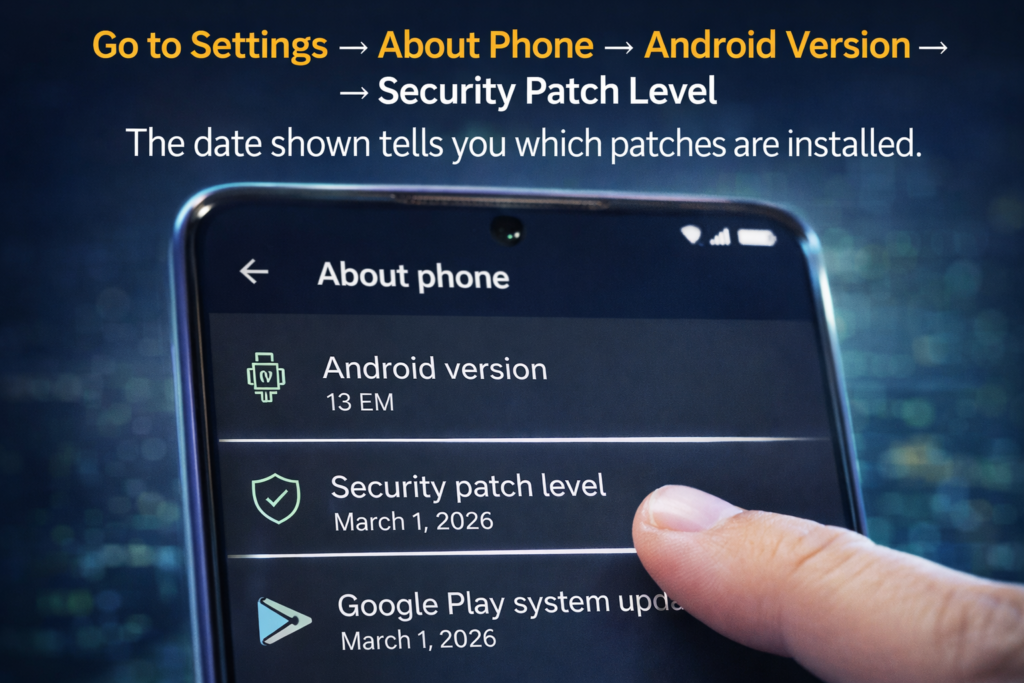
A: Go to Settings → About Phone → Android Version → Security Patch Level. The date shown tells you which patches are installed.
Q: Why should I install this update immediately?
A: The zero-day vulnerability is already being actively exploited. Installing the update closes this security hole and protects your device from attackers.
Q: Will this update slow down my phone?
A: No. Security updates don’t typically affect performance, and the optimizations included may actually improve GPU efficiency and app performance.
Q: What if my update isn’t showing yet?
A: Updates roll out in phases over 1-2 weeks. Wait a few days and check again. If it’s been longer, check your device manufacturer’s support pages.
Q: Can I still use my phone if I don’t update?
A: You can, but you’ll remain vulnerable to security issues that the patch fixes, including actively exploited zero-day vulnerabilities.
The Bottom Line
The Android March 2026 update is not routine maintenance. It’s a critical security release that fixes over 120 vulnerabilities, including at least one that attackers were actively using to compromise devices.
For most users, updating takes less than 15 minutes and requires minimal effort. The payoff is significant – better protection for your personal data, access to new features through Google Play, and improved device performance.
If you haven’t updated yet, now is the time. Go to Settings, check for updates, and install what’s available. Your future self – especially if you avoid a security headache – will thank you.